
A contact form on a static site: one function, server-side email and the bug that failed every message
One Vercel Function next to a static Astro build: a message-first form, three bot checks, EmailJS from the server, no-JS support and one ESM bug.
This site is static, so its contact form posts to one Vercel Function, api/contact.ts. The function checks for bots, validates with the same module as the page and sends the message through the EmailJS REST API, so no key reaches the browser and no check can be skipped. The form works without JavaScript too, and on 6 October 2026 one import made it fail every message.
TL;DR
- One function next to a static build: no adapter, no database, one validation module shared by the page and the server.
- Message first: one text box, the reply address found inside the message, and three bot checks (honeypot, Turnstile, rate limit).
- An import without
.jspassed every test and crashed every live request with HTTP 500. A unit test now reads that import.
Why one function and not a server?
The site builds with output: "static": every page is plain HTML on Vercel's CDN. Astro's usual answer for one dynamic route is an adapter plus prerender = false, as I described in Astro vs Next.js for a portfolio. I took a smaller step: a plain Vercel Function in apps/web/api/. Vercel's Node.js runtime turns a file in /api into a function and lets you "export each HTTP method as a separate export":
export async function POST(request: Request): Promise<Response> {
  const form = await request.formData();
  // bot checks, validation, Turnstile, then EmailJS
}

export function GET(request: Request): Response {
  return Response.redirect(new URL("/en/#contact", request.url).href, 303);
}
No adapter means astro preview still serves the build as it is, and the function's region (fra1) is one setting in vercel.json. The rest of the stack is in the case study of this site.
What happens to a message?
- 01 Form A plain POST to /api/contact/, or the same request sent in place by the page script.
- 02 Function api/contact.ts in Frankfurt, with no database behind it.
- 03 Checks Honeypot, rate limit, shared validation, Turnstile. The first failure answers.
- 04 EmailJS Its REST API, called with keys that only the server holds.
- 05 Inbox Reply-To carries the sender's email, if given, so answering takes one click.
Each check has its own answer, so the page can say exactly what went wrong:
| Check | Fails when | Answer |
|---|---|---|
| Honeypot | the hidden field is filled | 400, spam |
| Rate limit | more than 5 messages in 10 minutes from one IP (per instance) | 429, rate |
| Validation | the message isn't 2 to 4,000 characters, or there's no usable reply address | 400, the exact problem |
| Turnstile | the token fails siteverify (only when its secret is set) |
400, turnstile |
| EmailJS | mail isn't configured, or the call fails | 503, or 502 |
The form's events in the site's statistics carry the topic and the kind of error, never the text (how those statistics stay cookieless).
What does "message first" mean?
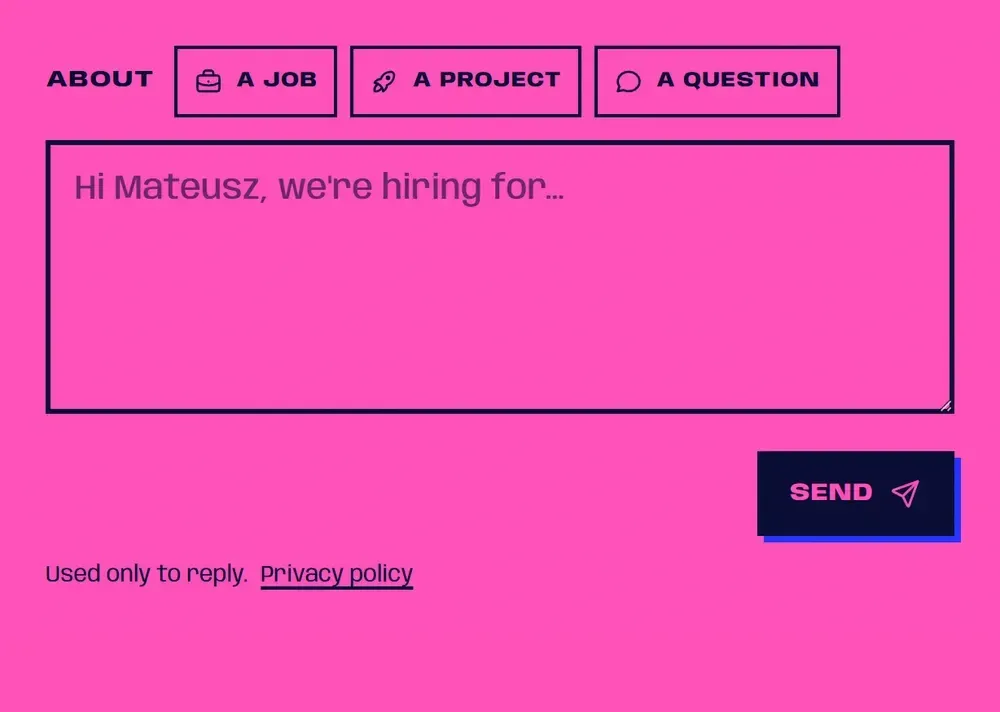 Empty
Empty 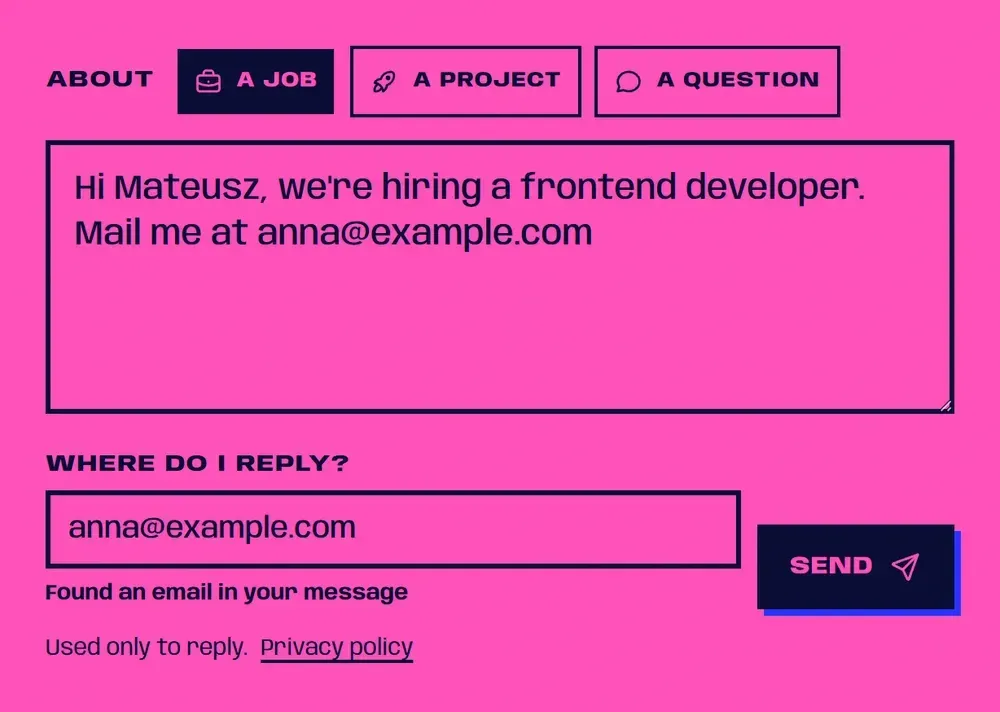 Reply found
 The form skips the usual name, email and subject fields. The reply field takes an email, a phone number or a LinkedIn profile link, and fills itself when the message holds one. Its note is a polite live region, so a screen reader reads it without interrupting. Once you edit the field, the script stops overwriting it.
export function findReply(message: string): { kind: ReplyKind; value: string } | null {
  const email = message.match(EMAIL)?.[0];
  if (email) return { kind: "email", value: email };
  const linkedin = message.match(LINKEDIN)?.[0];
  if (linkedin) return { kind: "linkedin", value: linkedin };
  for (const match of message.matchAll(new RegExp(PHONE.source, "g"))) {
    const value = match[0].trim();
    if (digits(value) >= 7 && digits(value) <= 15) return { kind: "phone", value };
  }
  return null;
}
An email wins, then LinkedIn, then a phone number of 7 to 15 digits. The rules live in src/lib/contact.ts, shared by the page script and the function, so the browser and the server can't disagree about a valid message. With JavaScript off, the server runs the same findReply. When the reply looks like a phone number, inputmode switches to tel, which per MDN lets the browser show a telephone keypad.
How does it stop bots without annoying people?
Three layers, the cheapest first:
- Honeypot. A
websitefield sits off-screen inside anaria-hiddenwrapper, withtabindex="-1"andautocomplete="off". People, keyboards and screen readers never reach it; a bot that fills every input does. - Turnstile. Cloudflare's script loads only after you start typing, and only when its site key is set. With
appearance: "interaction-only"the widget "becomes visible only when visitor interaction is required". Cloudflare warns that "the client-side widget alone does not protect your forms", so the function checks every token withsiteverify. A token validates once, so the page resets the widget after a failed send. - Rate limit. The function counts messages per IP in memory. The count lives in one instance, so it is best effort; a firm limit belongs in a Vercel WAF rule, which stops requests before they reach the function.
A fourth layer didn't survive. A minimum fill time blocked real people who wrote fast, so on 7 October I removed it. A unit test now says it plainly: "rejects a filled honeypot, never a fast sender".
Why does the server call EmailJS, not the browser?
EmailJS is built to be called from the browser, and its FAQ says a copied public key "will only be able to send your templates with your content". Hiding that key isn't the reason. There are two:
- Checks only count if they can't be skipped. If the page called EmailJS, any script could call it the same way, past the honeypot and Turnstile.
- The private key stays private. The function sends the account's private key as
accessToken, and that key exists only in the host's environment variables.
EmailJS blocks this by default: "API requests are disabled for non-browser applications" until you switch them on in the account's Security settings, where the private key is enabled too.
await fetch("https://api.emailjs.com/api/v1.0/email/send", {
  method: "POST",
  headers: { "Content-Type": "application/json" },
  body: JSON.stringify({
    service_id: process.env.EMAILJS_SERVICE_ID,
    template_id: process.env.EMAILJS_TEMPLATE_ID,
    user_id: process.env.EMAILJS_PUBLIC_KEY,
    accessToken: process.env.EMAILJS_PRIVATE_KEY,
    template_params: { subject, text, reply_to, topic, locale },
  }),
});
The EmailJS template holds the recipient and the layout; the function only fills in the variables. Without the service ID, the template ID or the public key it answers 503. After live sends answered 502 on 7 October, a refused call now logs EmailJS's status and reason, never the message or the sender.
Does it work without JavaScript?
Yes. The form is a plain <form action="/api/contact/" method="post">, and its path ends in a slash like every URL here, so the POST is never redirected. A hidden field carries the page's language.
The function reads the Accept header. The page script asks for JSON and gets { "ok": true } or { "ok": false, "error": "reply-missing" }. A plain form post gets a 303 See Other to a result page in the sender's language, such as /pl/contact/sent/. MDN calls 303 the usual answer to a POST "so the client may retrieve a confirmation" with GET, so a reload doesn't send the message twice. Both result pages are noindex and out of the sitemap.
How are errors shown?
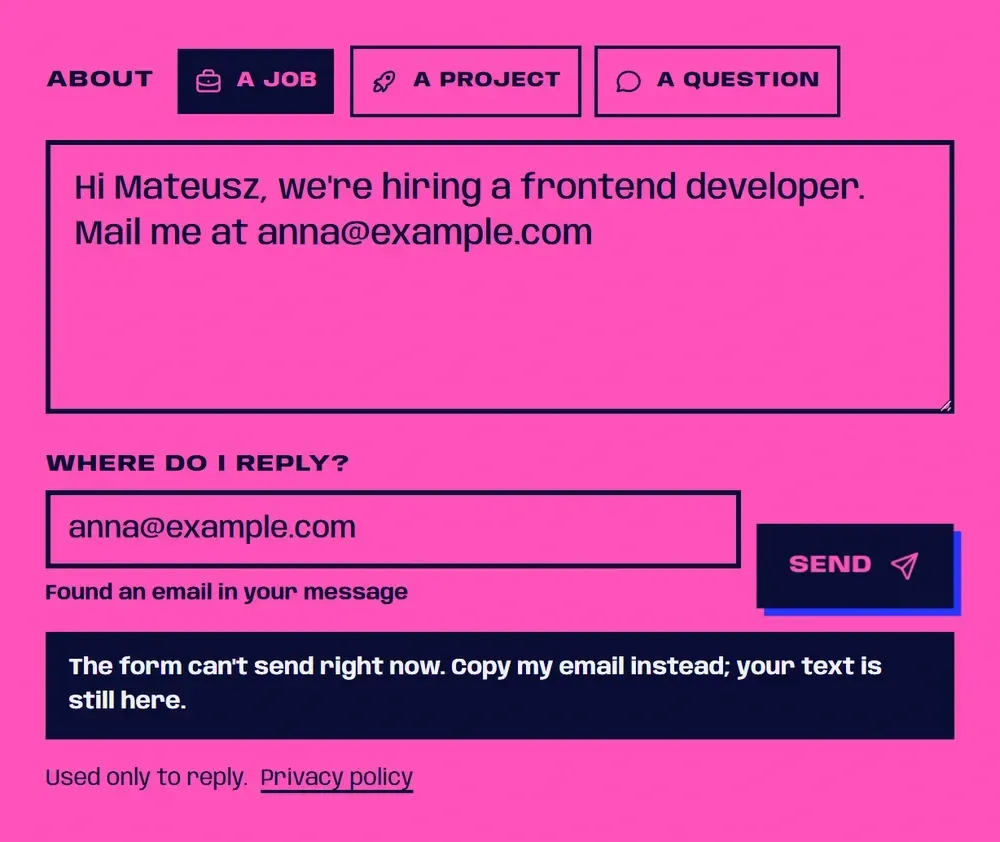
In words, in their own box, with your text kept. WCAG 3.3.1 Error Identification (Level A) asks that "the error is described to the user in text", so each kind of failure has its own sentence:
| Kind | What the page says |
|---|---|
message-empty |
Write a message first. One line is enough. |
reply-invalid |
I can't reply to that. Use an email, a phone number or a LinkedIn profile link. |
rate |
Too many messages from here. Please wait a few minutes, or copy my email. |
network |
No connection. Your text is still here; try again, or copy my email. |
The box is one role="alert" paragraph, hidden until something fails, which fits MDN's advice to keep the role "for content that is dynamically displayed". A field at fault gets aria-invalid and focus. The sentences are Lingui strings, translated at build time and handed to the script as JSON in a data attribute (how this site runs in three languages).
What broke on 6 October 2026?
Every message sent through the live form failed with HTTP 500. The function's log named the error: ERR_MODULE_NOT_FOUND.
The cause was one line. api/contact.ts imported the shared rules as ../src/lib/contact, with no extension. The app's package.json sets "type": "module", so Node.js loads the function as an ES module. That loader is strict: "A file extension must be provided when using the import keyword to resolve relative or absolute specifiers." The function compiled and deployed, then failed to load on every request.
Nothing caught it locally. Vitest resolves imports the way Vite does, and Vite's resolve.extensions tries .ts for "imports that omit extensions", so the unit tests passed. I reproduced the crash by compiling both files to ES modules and importing them in Node: the error without the extension, a clean import with it.
The fix is ../src/lib/contact.js, and a test now reads the function's source:
it("imports relative files with their .js extension", () => {
  const source = readFileSync(new URL("./contact.ts", import.meta.url), "utf8");
  const relative = [...source.matchAll(/from "(\.{1,2}\/[^"]+)"/g)].map((m) => m[1]);
  expect(relative.length).toBeGreaterThan(0);
  for (const path of relative) expect(path).toMatch(/\.js$/);
});
The incident exposed a second bug. When the platform answered with its own error, the page read Vercel's error body as one of my error kinds, found no sentence for it and showed an empty message. Now any answer that isn't the function's own falls back to "can't send right now", as in the shot above.
Limits
- The function's rate limit is per instance and starts over with each new one. A firm limit needs a WAF rule on the host, outside this repo.
- Turnstile protects the form only when both its keys are set: the site key loads the widget, the secret makes the function check it. Without them, the honeypot and the rate limit are the only bot checks.
- A message that mentions another long number, such as an order ID, can fill the reply field with it. The field stays editable, and the note says what was found.
- Nothing is queued. When EmailJS refuses, the form says so and offers my email address; the message isn't retried later.
If you'd like to try it, the contact form takes one line.
Sources
- Using the Node.js Runtime with Vercel Functions (Vercel Docs) (opens in a new tab) (accessed )
- WAF Rate Limiting (Vercel Docs) (opens in a new tab) (accessed )
- Modules: ECMAScript modules, Mandatory file extensions (Node.js docs) (opens in a new tab) (accessed )
- Shared options: resolve.extensions (Vite docs) (opens in a new tab) (accessed )
- Turnstile: Server-side validation (Cloudflare Docs) (opens in a new tab) (accessed )
- Turnstile: Client-side rendering (Cloudflare Docs) (opens in a new tab) (accessed )
- Turnstile: Widget configurations (Cloudflare Docs) (opens in a new tab) (accessed )
- EmailJS: /send API (opens in a new tab) (accessed )
- EmailJS: Is it okay to expose my Public Key? (opens in a new tab) (accessed )
- EmailJS: SDK options (private key) (opens in a new tab) (accessed )
- EmailJS Node.js SDK, README (GitHub) (opens in a new tab) (accessed )
- 303 See Other (MDN) (opens in a new tab) (accessed )
- ARIA: alert role (MDN) (opens in a new tab) (accessed )
- inputmode (MDN) (opens in a new tab) (accessed )
- Understanding SC 3.3.1: Error Identification (W3C WAI, WCAG 2.2) (opens in a new tab) (accessed )