
Shipping a mobile app alone: Linkoglot, from one codebase to two app stores
How I built and shipped Linkoglot, an AI language app, alone: Expo, Supabase, RevenueCat, Lingui in 30 languages, and what both app stores ask for.
I built Linkoglot, an AI language-learning app, alone in a few months, and shipped it to Google Play on 10 July 2026 and to the App Store on 21 July 2026. One person can cover two platforms because every heavy job has a tool behind it: Expo, Supabase, RevenueCat and Lingui. What stays with you is scope, the store rules, and deciding what the phone is never trusted with.
TL;DR
- Alone means every layer: the app, the database, the AI prompts, payments, store listings, a website, legal documents and account deletion.
- Expo builds both native apps from one codebase, RevenueCat puts one SDK over both stores' billing, and Postgres enforces the rules a client could fake.
- Both stores ask for account deletion, privacy disclosures and store billing for digital features. Plan them as features in week one, not as paperwork in the last week.
What did "alone" include?
Linkoglot turns what is around you into study material. You point the camera at a scene, a page of text or a few objects, and AI turns the photo into flashcards, quizzes and challenges. Then you practise: text chats with an AI tutor, pronunciation, and real-time voice conversations.
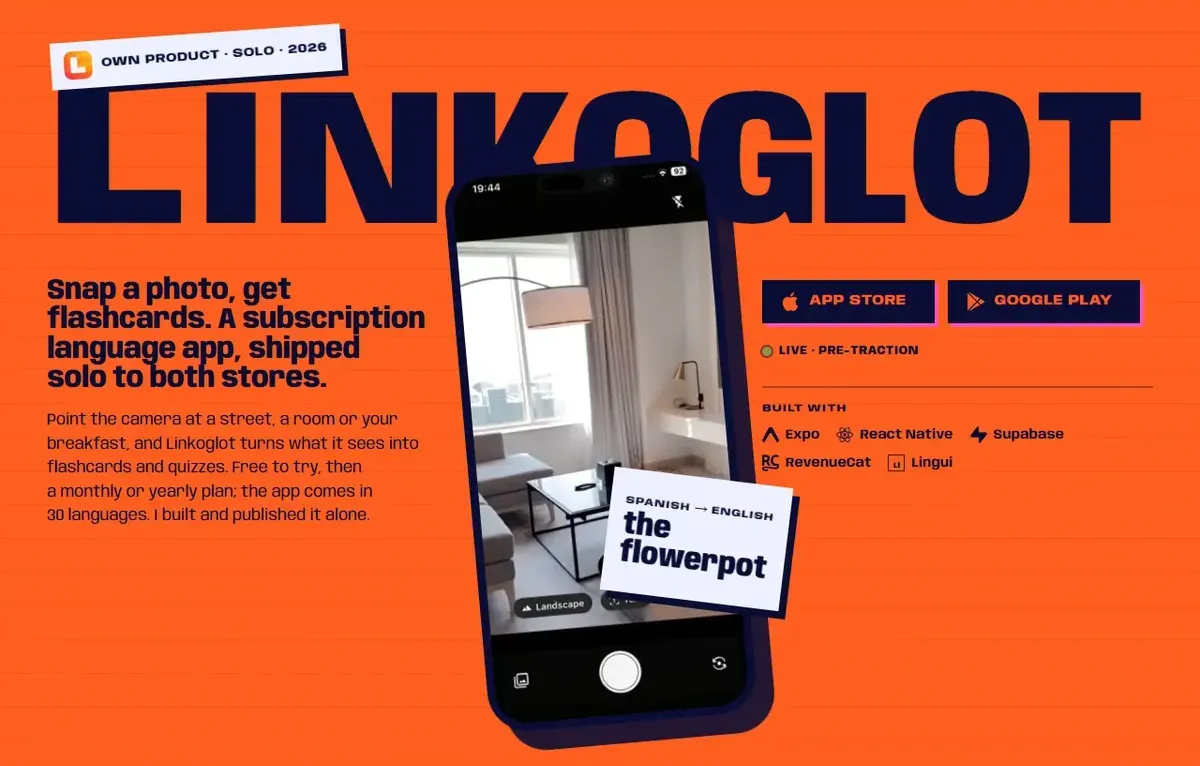
Building it alone meant every layer, not only the app:
- the product and its design;
- the Expo app for iPhone and Android;
- the Supabase schema, row-level security and triggers;
- the AI prompts;
- payments: a free trial, then a monthly or yearly subscription;
- both store listings, with translated text and screenshots per language;
- a Next.js website in 30 locales, the privacy policy, the terms and a page for deleting your account;
- a spin-off, the npm CLI
lingui-translate-ai.
I wrote a lot of it by hand at first, and later a lot with AI. Either way, each decision below was mine to make and mine to fix.
Which jobs does the stack carry?
| Job | Tool | What it does |
|---|---|---|
| Native iOS and Android projects | Expo, with a development build and prebuild | Generates the ios and android folders from the app config and config plugins |
| Building and signing | EAS Build | Hosted builds; iOS builds run on Expo's macOS runners, and it can manage keystores, provisioning profiles and certificates |
| Accounts, data, photos, live updates | Supabase | Google and Apple sign-in, Postgres, Storage, Realtime |
| Server data on the phone | TanStack Query | A client cache that the app keeps between launches |
| Subscriptions on both stores | RevenueCat | One SDK over StoreKit and Google Play Billing |
| 30 languages | Lingui | Messages in the code, a .po catalog per language |
The UI is NativeWind with React Native Reusables.
Expo calls its approach Continuous Native Generation: "short-lived native projects are generated only when needed". Hand edits to those folders can be lost on the next npx expo prebuild --clean, so changes belong in config plugins. Even Linkoglot's one native extra, an iOS Notification Service Extension for push notifications, is generated: @bacons/apple-targets builds it during prebuild from a targets/ folder.
The development build (the app compiled with expo-dev-client) matters for payments too. RevenueCat's Expo guide warns that in Expo Go the SDK swaps native calls for mock APIs, and "real purchases will not function in this mode".
What should the database decide, not the phone?
A phone app is a client you don't control, so two parts of Linkoglot never depend on the phone telling the truth.
Achievements. XP, achievements and day streaks are the game layer. Postgres awards achievements with AFTER INSERT and AFTER UPDATE triggers that call a function in a private schema. The achievements table has row-level security on, with every client operation disabled. Supabase's docs state the effect: with RLS on, "no data is accessible through the API when using a publishable key, until you create policies". So the app can't grant itself an achievement, and the rule is written once for both platforms.
Photos. Only a compressed copy ever leaves the phone:
- 01 On the phone The photo is resized to 1280 px tall and saved as a JPEG at quality 0.25.
- 02 Into Storage It uploads to the user's own folder in Supabase Storage.
- 03 Analysed on the server The analysis runs server-side, and the app reads the result back.
What do the stores ask for before you ship?
Store rules turn into screens, forms and code, so they belong in the plan. These four shaped Linkoglot:
| Requirement | Rule | In Linkoglot |
|---|---|---|
| Delete your account | Apple 5.1.1(v): an app with account creation must offer deletion in the app. Google Play: an in-app path plus a web link for deletion requests | Deletion in the app, and a Delete Account page on the website |
| A private login option | Apple 4.8: an app with Google Sign-In or another social login must also offer an equivalent login that limits data to name and email, lets people keep their email private and doesn't collect app interactions for ads without consent | Sign in with Google and with Apple |
| Privacy disclosures | Apple's privacy details, which include data your third-party SDKs collect. Google Play's Data safety form, required even on closed and open testing tracks | The App Store lists Purchases, Contact Info, User Content, Identifiers, Usage Data and Diagnostics as linked to you. Play states that data is encrypted in transit and that you can request deletion |
| Store billing for digital features | Apple 3.1.1: paid features inside the app need in-app purchase. Google Play: in-app features and digital content go through Google Play's billing system, with listed exceptions | RevenueCat over both billing systems |
What did the first update fix?
Version 1.0.1 reached Google Play on 22 July and the App Store on 29 July. The release note: "Fixed a bug where study sets generated with AI in the background were saved correctly but didn't refresh on screen."
The data was right and the screen was stale. With a client cache like TanStack Query, a screen shows cached data until something marks it out of date. TanStack's docs describe invalidateQueries for the case "when you know for a fact that a query's data is out of date": it marks queries stale and refetches the ones on screen. So a background job that writes data has a second job: telling the screen.
How do subscriptions work across two stores?
The model is a free download, a free trial, then a monthly or yearly subscription. RevenueCat describes its product as "a backend and SDKs that wrap StoreKit, Google Play Billing, and RevenueCat Billing". In the app, its react-native-purchases SDK sits behind my own hooks for setup, purchase, cancellation and currency conversion. The access check RevenueCat documents is short:
const customerInfo = await Purchases.getCustomerInfo();
// "pro" stands for your own entitlement identifier
const hasAccess = typeof customerInfo.entitlements.active["pro"] !== "undefined";
An entitlement, in RevenueCat's words, is "a level of access, features, or content that a user is 'entitled' to". The SDK caches it and refreshes the cache when it is older than 5 minutes, but only on getCustomerInfo(), a purchase or a restore. For changes in between, addCustomerInfoUpdateListener fires whenever the info changes on the device.
Credits on top of the subscription. AI features are metered in credits. A plan includes a monthly allowance, and extra credits never expire. The published cost table (dated 7 June 2026) shows how far apart the features are:
| Feature | Recommended model | Max model |
|---|---|---|
| Flashcards, base generation | 0.88 | 2.4 |
| Chat, per message | 1.7 | 5.52 |
| Voice conversation, per minute | 100 | 100 |
On the recommended model, one minute of voice costs as many credits as about 59 chat messages.
How does one person ship 30 languages?
The App Store lists 30 languages for Linkoglot, and the website has the same 30 locales, each with an hreflang alternate. Text lives in four places, and each one has its own route:
- App strings. Lingui, with a
.pocatalog per language, the same library this site uses (how this site was built). Lingui vs i18next compares the two libraries. - Translation at scale. An in-repo script sent catalogs to an LLM in batches. On 17 June 2026 it became the npm CLI
lingui-translate-ai, and version 1.1.0, with ICU plural support, came out on 10 July 2026, the day the Play release went live. How the tool works, and how I check its drafts. - Database content. Achievement names and descriptions are stored as jsonb, and a
translate_columntrigger fills in the translations. - Store listings. Translated listing text and screenshots per language.
One check if you do the same: Lingui's React Native guide notes that Intl support "can vary across React Native and OS versions" and polyfills Intl.Locale and Intl.PluralRules. Linkoglot runs on iOS 16.4 and Android 7.0 and up, so test plurals on the oldest versions you support.
Limits
- No usage numbers: the app is live but pre-traction, and this post is about building and shipping, not growth.
- It skips the review rounds, how the AI and voice features run in production, and why I picked each tool over its alternatives. Each deserves its own post.
- Store texts and the credit table are quoted as published on the dates given. Prices and costs can change after that.
Linkoglot has its own chapter on my home page, next to the rest of my projects on the work page.
Sources
- Continuous Native Generation (Expo docs) (opens in a new tab) (accessed )
- Introduction to development builds (Expo docs) (opens in a new tab) (accessed )
- EAS Build (Expo docs) (opens in a new tab) (accessed )
- expo-apple-targets, @bacons/apple-targets (GitHub) (opens in a new tab) (accessed )
- Using RevenueCat with Expo (RevenueCat docs) (opens in a new tab) (accessed )
- Entitlements (RevenueCat docs) (opens in a new tab) (accessed )
- Getting subscription status (RevenueCat docs) (opens in a new tab) (accessed )
- App Review Guidelines (Apple Developer) (opens in a new tab) (accessed )
- App privacy details on the App Store (Apple Developer) (opens in a new tab) (accessed )
- App account deletion requirements (Play Console Help) (opens in a new tab) (accessed )
- Data safety section (Play Console Help) (opens in a new tab) (accessed )
- Payments policy (Play Console Help) (opens in a new tab) (accessed )
- Row Level Security (Supabase docs) (opens in a new tab) (accessed )
- Query Invalidation (TanStack Query docs) (opens in a new tab) (accessed )
- React Native internationalization (Lingui docs) (opens in a new tab) (accessed )
- Linkoglot on the App Store (opens in a new tab) (accessed )
- Linkoglot: AI Credits (opens in a new tab) (accessed )