
Claude Code skills, hooks, MCP servers and subagents: which one when
When to use CLAUDE.md, a skill, a hook, an MCP server or a subagent in Claude Code: the official docs, plus the real setup that built this site.
Use CLAUDE.md for what Claude must know in every session, a skill for a procedure it needs only sometimes, and a hook for anything that must happen every time. Reach for an MCP server when the data lives outside your repo, and a subagent when side work would flood your context. Below: each piece from the official docs, then the setup that built this site.
TL;DR
- Request or enforcement: CLAUDE.md and skills are instructions Claude interprets; a hook always fires on its event.
- Context cost: CLAUDE.md is paid on every request, skills and MCP tools cost little until used, and a subagent works in its own window and returns a summary.
- Add pieces when their trigger appears: a repeated correction, a pasted playbook, data copied from a browser tab, a flooded context, a rule that must hold every time.
What are the five pieces?
- 01 CLAUDE.md Loaded in every session: commands, conventions, always-rules.
- 02 Skills A playbook that loads when the task matches, or when you type /name.
- 03 Hooks Your script, run by Claude Code on an event, every time.
- 04 MCP servers Tools and data from outside the repo, over an open standard.
- 05 Subagents Side work in their own context. Only a summary comes back.
A few details from the docs matter here. The memory docs suggest keeping each CLAUDE.md under 200 lines. Custom slash commands have been merged into skills. A hook handler can be a shell command, an HTTP request, an MCP tool call, a prompt or a subagent.
Plugins bundle all of these into one installable unit for reuse across repositories. This repo ships none, so I leave them out.
Which two questions sort almost every case?
Who decides that it runs? The docs put it bluntly: a hook "always fires on its event; the trigger is guaranteed", while a skill is instructions Claude interprets, so the "outcome can vary". CLAUDE.md is in the second group: the memory docs say Claude treats it "as context, not enforced configuration". So "never edit .env" in CLAUDE.md is a request, and a PreToolUse hook that blocks the edit is enforcement.
What does it cost in context? From the docs' context cost table:
| Piece | When it loads | Context cost |
|---|---|---|
| CLAUDE.md | session start, full content | every request |
| Skill | descriptions at start, body when used | low until used |
| MCP server | tool names at start, schemas on demand | low until a tool is used |
| Subagent | when spawned, in its own window | isolated from the main session |
| Hook | on its event, runs outside the model | zero, unless it returns context |
That is why a long CLAUDE.md is a bad home for reference material: you pay for it on every request, needed or not.
Which building block fits which need?
| You need | Reach for | Why |
|---|---|---|
| Claude to know your commands and conventions every time | CLAUDE.md | always loaded |
| A procedure with side effects that you start yourself | skill with disable-model-invocation: true |
only you trigger it, and its description stays out of context |
| Background knowledge Claude applies when relevant | skill, user-invocable: false if it isn't a command |
loads on demand |
| Something on every edit, prompt or stop, no exceptions | hook | deterministic |
| To block a dangerous action | PreToolUse hook or permission rules |
enforcement, not a request |
| Data from a system Claude can't see | MCP server | the server handles the connection and auth |
| Research that reads many files, or parallel work | subagent | only the summary comes back |
| Frequent back-and-forth on one problem | the main conversation | the docs recommend it over subagents here |
The docs also suggest adding pieces when their trigger appears, not up front:
- A convention Claude gets wrong twice goes into CLAUDE.md.
- A playbook pasted for the third time becomes a skill.
- Data you keep copying from a browser tab becomes an MCP server.
- A side task that floods the conversation goes to a subagent.
- Anything you want every time without asking becomes a hook.
What does my setup look like?
This site was built with Claude Code and a project wiki in .claude/project-info/. Here is each piece in that repo.
CLAUDE.md: a router, not an encyclopedia
My CLAUDE.md is 76 lines. Most of it is a routing table that maps the words I type ("locales, translation, hreflang") to wiki pages. The rest is the invariants (performance budgets, licences, "no invented facts") and the commands.
The paths are plain text on purpose. An @import would load every page into every session, and the docs confirm imports "don't reduce its context cost". The wiki has its own post: An LLM wiki: project memory for Claude Code.
Three hooks
{
  "hooks": {
    "SessionStart": [{ "hooks": [{ "type": "command",
      "command": "node .claude/hooks/session-start.mjs", "timeout": 10 }] }],
    "UserPromptSubmit": [{ "hooks": [{ "type": "command",
      "command": "node .claude/hooks/wiki-context.mjs", "timeout": 10 }] }],
    "Stop": [{ "hooks": [{ "type": "command",
      "command": "node .claude/hooks/wiki-check.mjs --stop-hook", "timeout": 30 }] }]
  }
}
Trimmed: the real .claude/settings.json prefixes each path with ${CLAUDE_PROJECT_DIR:-.} and runs the commands through bash.
- SessionStart prints a "session card": a pointer to the working agreement, the git state as counts only, and the rules from
lessons.md. It fires on startup, on resume, after/clearand after compaction. So after every compaction the rules come back word for word, whatever the summary dropped. - UserPromptSubmit scores each prompt against the routing table and names up to five pages to read. Prompts under 25 characters get nothing.
- Stop checks whether code changed this session without a wiki change. If so, it returns
decision: "block"with a reason, once per state, so Claude updates the page before it finishes. It exits early whenstop_hook_activeis true, the field the docs provide against endless blocking.
All three are plain Node scripts that exit cleanly on their own errors. A guard that breaks the session is worse than no guard.
Nine skills
| Skill | Invoked by | What it does |
|---|---|---|
code |
me or Claude | the coding loop: read the routed pages, match the codebase, verify before calling it done |
commit |
me or Claude | one Conventional Commit, pinned to the small Haiku model so it stays fast |
new-blog |
me or Claude | plans, writes and checks a post like this one, with a reading lint and a screenshot script |
new-cv |
me or Claude | updates the CV page and its PDFs from one data file |
lighthouse-qa |
me or Claude | runs Lighthouse on the built site and fixes issues in a loop |
wiki-lint |
me or Claude | runs the mechanical wiki lint, then reads the pages for contradictions |
awwwards |
Claude only | studies award-level sites in a real browser to lift one flat section |
search-registry-items |
Claude only | finds a UI component in public shadcn registries through an MCP server |
start-project-info |
me only | sets up the wiki, routing table, lessons and hooks in a new project |
"Claude only" is user-invocable: false: background knowledge that isn't a sensible command. "Me only" is disable-model-invocation: true: that skill writes many files, so I start it myself, and its description costs no context until I do. How new-cv keeps the page and the PDF in step is in a web CV and PDF from one source.
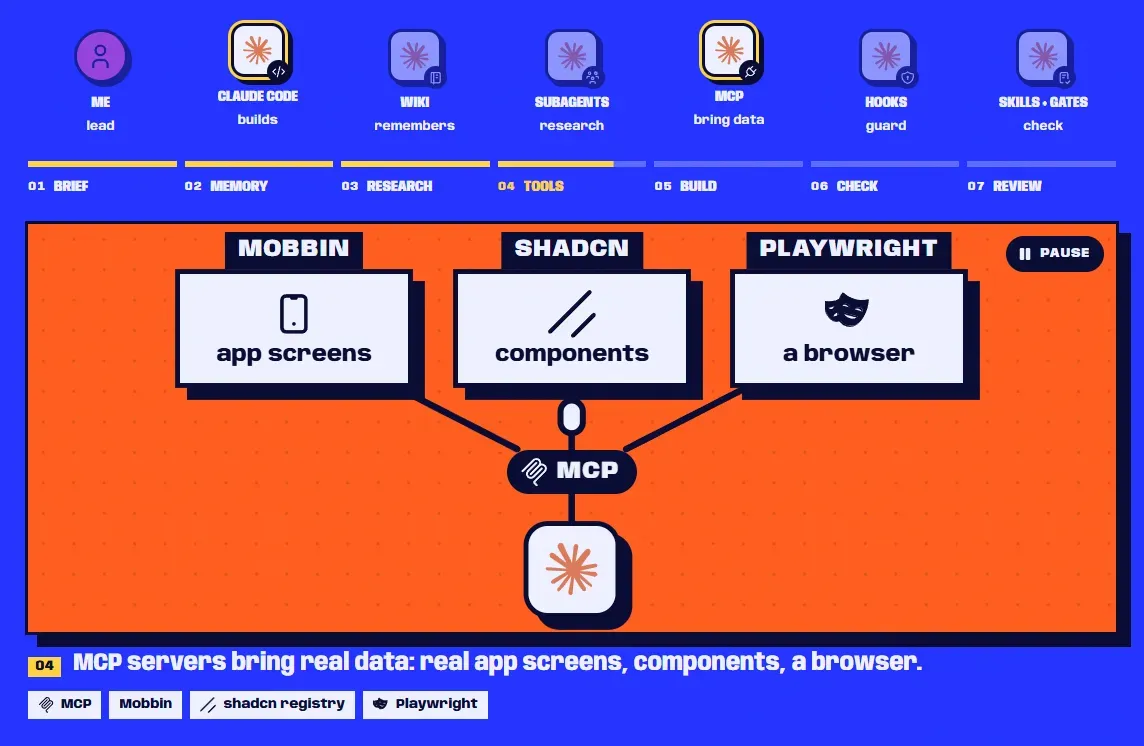
Three MCP servers
None of them is configured in this repo. They live at user level, so every project can use them.
- Mobbin, a library of real app and web screens. Its MCP server lets an agent search it in plain words and get screens back. I used it to research sections before designing them.
- Shoogle, a search over shadcn/ui blocks across registries. The
search-registry-itemsskill tells Claude when to call it. - A real browser. Playwright MCP drives a browser through accessibility snapshots; Claude in Chrome connects Claude Code to Chrome itself, with its login state.
The MCP docs carry a warning worth repeating: trust each server you add, because servers that fetch outside content can expose you to prompt injection.
Subagents
I have no custom subagent files; the built-in ones were enough. While planning, the wiki's log records one batch of 8 research agents and one of 3, each on its own topic. They wrote raw notes, and I condensed them into the routed pages.
One lesson came out of it: parallel agents share one web search budget and can run it dry. Prefer fetching URLs you already know.
How do they combine?
The pieces get useful when they cover each other's weak spots.
- Skill + MCP. The server gives Claude a tool. The skill says when it's worth calling and what to do with the result. The docs describe this exact pattern.
- CLAUDE.md + hook. The routing table is plain markdown that I read and edit. The prompt hook parses that same table, so adding a row is all it takes to route a new page.
- Hook + skill.
wiki-check.mjsis the mechanical half: paths exist, every page is listed, log entries have the right shape. Thewiki-lintskill is the judgement half: do two pages contradict each other? A script can't judge, and a model can't be trusted to run every time. - Skill + subagent. A skill can run in a forked subagent (
context: fork), and a subagent can preload skills. I use neither, butnew-blogdoes the simple version: its last step hands the finished post to a fresh subagent for a cold read.
Limits
- Command hooks run with your full user permissions. The hooks reference says so directly. Read any hook before you add it, especially one copied from another repo.
- Skill descriptions are not free. Each skill Claude can invoke has its description in context, and the listing has a budget. When it overflows, Claude Code drops the descriptions of the skills you invoke least. Vague or overlapping descriptions also make Claude pick the wrong skill.
- Keyword routing misses. My prompt hook scores words, not meaning. Early on, a generic phrase in one row outscored a project name in another and cut the page that mattered. The fix was boring: put shared task words in every row they apply to, then re-run the hook's
--testmode. - Subagents start blank. A subagent sees only the delegation message, not your conversation, so a vague brief gets a vague summary. Its requests also count toward your usage.
- I haven't measured the savings. I can't give a token or time figure for these hooks. What I can say: after a compaction, the next turn starts with the rules instead of with me repeating them.
Where should you start?
Write a short CLAUDE.md first, then add each piece when its trigger shows up. The whole process that built this site is in the case study, and the projects are on the work page.
Sources
- Extend Claude Code (Claude Code docs) (opens in a new tab) (accessed )
- Extend Claude with skills (Claude Code docs) (opens in a new tab) (accessed )
- Hooks reference (Claude Code docs) (opens in a new tab) (accessed )
- Automate actions with hooks (Claude Code docs) (opens in a new tab) (accessed )
- Connect Claude Code to tools via MCP (Claude Code docs) (opens in a new tab) (accessed )
- Create custom subagents (Claude Code docs) (opens in a new tab) (accessed )
- How Claude remembers your project (Claude Code docs) (opens in a new tab) (accessed )
- Use Claude Code with Chrome (Claude Code docs) (opens in a new tab) (accessed )
- Playwright MCP (GitHub, Microsoft) (opens in a new tab) (accessed )
- Shoogle: search shadcn/ui blocks across registries (GitHub) (opens in a new tab) (accessed )
- Mobbin (opens in a new tab) (accessed )