
How do you keep a web CV and its PDF from drifting apart?
My CV page and its PDFs in English, Polish and Spanish come from one TypeScript file: Playwright prints a designed A4 sheet, and a test fails on drift.
Keep the CV as data, not as two documents. On this site one TypeScript file feeds the /cv/ page and a designed A4 sheet that Playwright prints into PDFs in English, Polish and Spanish. A unit test fails when the data changes and the PDFs weren't printed again, so the page and the file can't quietly say different things.
TL;DR
- One file,
src/data/cv.ts, holds every CV fact in three languages. Two layouts read it:CvSheet.astrofor paper andCvWeb.astrofor the screen.bun run cv:sheetprints the sheet with Playwright'spage.pdf(), fits it to two A4 pages and checks the PDF's text before it replaces the live file.- The sheet carries a digest of the data it shows.
cv.test.tsfails when the data no longer matches the PDFs.
Why does a CV drift in the first place?
Because it usually exists twice: a PDF made in a document editor, and a web page typed by hand. Every change has to land in both, and sooner or later one is forgotten: the page gets the new job, the PDF keeps the old title. Add three languages and you have six copies.
My project wiki has a one-line rule: never edit the page or the PDF alone. Rules only hold when something enforces them, so this setup turns drift into a failing test instead of a matter of memory.
What lives in the data file?
cv.ts exports one object. Every string that changes with the language is a record with one value per locale:
export type Text = Record<Locale, string>; // { en, pl, es }

export interface CvEntry {
  id: string;
  title: Text;
  org?: Text | undefined;
  when: Text; // shown as written: "2026", "Since 2022"
  bullets: Text[];
  links?: { label: string; href: string }[];
  short?: { name: string; note: Text }; // one line for the home page
  current?: boolean; // the role I hold now
  placeholder?: boolean;
}
Then come the sections, from the summary and experience down to the languages and the one-line recruitment clause Polish recruiters expect. A value that isn't final yet carries a placeholder flag, and the print script warns about it.
The CV text is long-form content, so it lives here per locale. Short interface strings, like the heading "Experience", go through Lingui like every other label on the site (why Lingui and not i18next). More than the CV reads this file:
| Reader | What it takes |
|---|---|
/<locale>/cv/ |
everything, in a layout for screens |
/<locale>/cv/print/, and from it the PDFs |
everything, on the A4 sheet |
| The home page's Competences | the credentials, plus a timeline from the short lines |
| The Person structured data | the job title and the summary |
llms.txt |
title, summary, location and languages |
Why does the PDF get its own layout?
Because paper and a screen have different readers. My first version rendered one component twice: a poster for the screen, a plain column for paper. On 8 October 2026 a designed two-page sheet replaced it, and the web page got a layout of its own: a screen copy of the PDF would have been boring.
 /cv/ page
 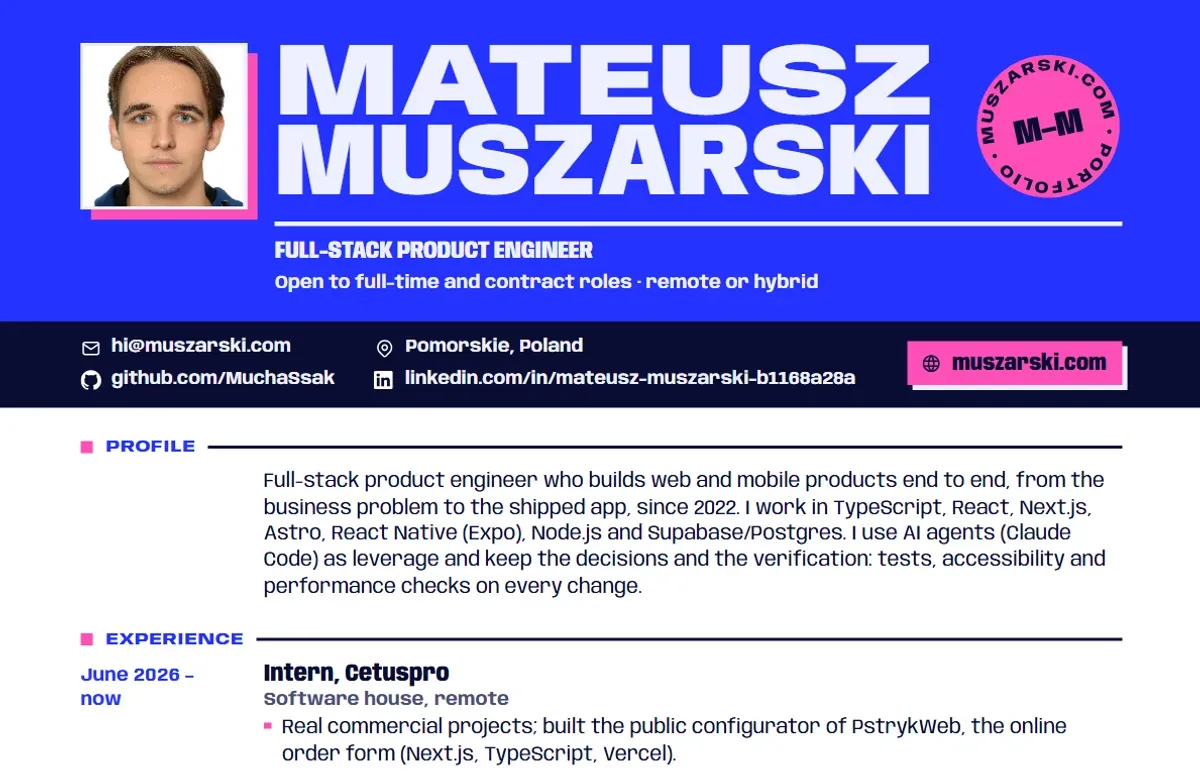 PDF, page 1
 The sheet serves two readers at once: a recruiter who skims page 1 for who, what, where and how to reach me, and an applicant tracking system (ATS) that wants real text in reading order. The screen keeps the same sections, order, words and links, and adds colour, the projects' media and copy buttons. An end-to-end test checks that the Polish page lists its sections in the sheet's order.
How does Playwright turn the sheet into a PDF?
- 01 cv.ts Every CV fact, once per language.
- 02 The sheet The print route renders CvSheet.astro.
- 03 Print Playwright prints it and fits it to two A4 pages.
- 04 Checks Fonts, reading order, links and dates in the PDF's text.
- 05 Files The PDF, its page previews and the data's digest.
- 06 cv.test.ts Fails when the data moved on since the print.
bun run cv:sheet builds the site, serves it on a free port and prints /<locale>/cv/print/ for each language once the fonts are in:
await page.goto(`${base}/${locale}/cv/print/`, { waitUntil: "networkidle" });
await page.evaluate(() => document.fonts.ready);

// --d runs from 0 (densest) to 1 (roomiest); every size and gap on the sheet reads it
const pdfAt = async (d) => {
  await page.evaluate((v) => document.documentElement.style.setProperty("--d", String(v)), d);
  return page.pdf({ format: "A4", printBackground: true, preferCSSPageSize: true, tagged: true, outline: true });
};
Per the Playwright docs, page.pdf() renders with print CSS media and defaults to Letter, so I set A4. preferCSSPageSize lets the @page size win, printBackground keeps the cobalt band, and tagged plus outline give an accessible PDF with bookmarks.
Waiting on document.fonts.ready matters with a custom font: per MDN it resolves once the fonts have loaded and layout is done. The script then binary-searches the roomiest --d that still fits two pages, and pdf-lib adds the title, author and language.
The PDFs are committed to public/files/, because the deploy build has no browser to print them. I also looked at react-pdf and Typst: good tools, but both meant describing the layout a second time, the very drift I was removing.
What does the print CSS do?
The print route has no site chrome and no motion, and sets up the paper itself (simplified):
@page {
  size: A4;
  margin: 18mm 0 14mm;
}
@page :first {
  margin: 0 0 14mm; /* the cobalt band opens page 1 */
}
:root {
  color-scheme: light;
}
.cs-entry {
  break-inside: avoid;
}
.cs-sec h2 {
  break-after: avoid;
}
Page 1 has no top margin, so the PDF's text starts with my name. Page 2's margin carries a running head and the page number, drawn as outlines so no second name lands in the text. The light color-scheme overrides the site's dark one. The two break- rules keep an entry on one page and a heading off the bottom of one.
The /cv/ page has its own Print button. It calls print(), and an @media print block strips the site's chrome and turns the page white.
What broke when I first printed it?
Each check in the script exists because this went wrong once:
- Text came out in the wrong order. Chrome writes a PDF's text in paint order, and a positioned box paints after in-flow content: the contact bar landed before my name. Now nothing that holds text is positioned or transformed.
- A variable font printed as Type 3 glyphs, which some parsers read badly. The sheet uses static instances of the same typeface, made by
bun run cv:fonts. - Wide letter-spacing split words. A tracked heading came out of an extractor as "E D U C A T I O N". Tracking now stays at 0.05 em or less.
So cv:sheet reads every PDF back with pdf.js. It fails the print when my name isn't the first text, a heading is out of order, a font isn't embedded TrueType, a link isn't clickable or a date leaves its title's baseline. A failed print never replaces a live PDF.
How does a test catch a stale PDF?
With a fingerprint of the data. cvDigestSource(locale) keeps only that locale's strings from the CV object and turns them into JSON. The print route hashes that (SHA-256, first 16 hex characters) into a <meta name="cv-digest"> tag, and the script copies the value into cv-digest.json next to the PDFs. The test recomputes the hash from the current data:
describe.each(["en", "pl", "es"] as const)("CV PDF (%s)", (locale) => {
  it("was printed from the current CV data", () => {
    const recorded = JSON.parse(readFileSync(new URL("cv-digest.json", files), "utf8")) as Record<string, string>;
    expect(recorded[locale], "run `bun run cv:sheet` (in apps/web)").toBe(digest(locale));
  });

  it("has its page previews for the /cv/ page", () => {
    expect(existsSync(new URL(`mateusz-muszarski-cv-${locale}-p1.webp`, files))).toBe(true);
  });
});
The digest is per locale, so a Spanish typo fails only the Spanish check, and the failure message is the fix. Two more guards sit around it: the launch build stops when a PDF is missing, and an end-to-end test checks that the Polish "Pobierz PDF" link carries download and returns 200.
What does the visitor get?
On /cv/ the first button is the PDF, its size read from the file at build time. It is a plain link with the download attribute, which MDN notes works only for same-origin URLs: one more reason the files live on the site. The site's CV button (header, hero, menu, footer) starts that download inside the click, then opens /cv/, which confirms it.
The PDF's text is real text: pdftotext on the Polish file starts with my name, every diacritic intact. The files are tagged and declare their language.
Limits
- The digest covers
cv.tsonly. After a change to the sheet, the print route or the CV headings, I runbun run cv:sheetby hand. - The checks read the text the way a parser would (pdf.js, pdftotext); none of them is a real applicant tracking system.
- They prove the text layer, not the look: I still open the page previews after every print.
- The Spanish text is machine-assisted and still waits for a native speaker's review.
The result is at /en/cv/, one click from the PDF. The name across its top is sized by a build-time text fit, and the rest of the site's story is in the case study.
Sources
- page.pdf() (Playwright docs, class Page) (opens in a new tab) (accessed )
- @page (MDN) (opens in a new tab) (accessed )
- Printing (MDN, CSS media queries guide) (opens in a new tab) (accessed )
- break-inside (MDN) (opens in a new tab) (accessed )
- FontFaceSet: ready property (MDN) (opens in a new tab) (accessed )
- <a>: the download attribute (MDN) (opens in a new tab) (accessed )
- react-pdf (opens in a new tab) (accessed )
- Typst documentation (opens in a new tab) (accessed )