
Motion that respects people: prefers-reduced-motion and a pause button
How this site handles motion: a WCAG 2.2.2 pause control, prefers-reduced-motion, loops that stop offscreen and reveals that never hide content.
Motion that respects people does four things. It shows the final state under prefers-reduced-motion, offers one remembered pause button for every loop, stops loops nobody can see, and never hides content when a script fails. This site does all four with one small module and a button.
TL;DR
- Two criteria: WCAG 2.2.2 (Level A) asks for a way to pause motion that starts on its own and lasts over 5 s; 2.3.3 (Level AAA) asks that motion triggered by interaction can be turned off.
- One switch: a class on
<html>pauses every CSS and JavaScript loop, is stored inlocalStorageand applied before the first paint; reduced motion skips straight to final states.- Fail open: loops stop offscreen, reveals hide content only after their script runs, and the H1 (the LCP element) never animates on load.
Which WCAG criteria apply to motion?
2.2.2 Pause, Stop, Hide is Level A, the baseline. Moving, blinking or scrolling content that starts on its own, lasts more than five seconds and sits next to other content needs a way to "pause, stop, or hide it". Five seconds, says the Understanding document, "is long enough to get a user's attention, but not so long that a user cannot wait out the distraction". It also recommends one control for everything that moves.
2.3.3 Animation from Interactions is Level AAA. It reads: "Motion animation triggered by interaction can be disabled, unless the animation is essential to the functionality or the information being conveyed". It protects people with vestibular (inner ear) disorders, where "triggered reactions include nausea, migraine headaches, and potentially needing bed rest to recover". One of its techniques (C39) is the prefers-reduced-motion media query.
They are different switches. 2.2.2 is about attention, for everyone: a marquee in the corner of your eye while you read. 2.3.3 is about the body. A system setting helps people who know it exists; a visible button helps everyone else, including someone on a borrowed laptop. So I do both.
What moves on this site?
The home page's first screen alone runs three loops:
The full list, and what each control does to it:
| Motion | Reduced motion | Pause button | Offscreen |
|---|---|---|---|
| Tool marquee (a 50 s loop) | never starts; the list wraps into rows | paused | paused |
| Spinning sticker (a 22 s loop) | finishes at once | paused | paused |
| Letter accordion on my name | never starts | eases back and stops | stops |
| Sections that advance on their own (How I work, AI, Competences) | stay put, scene drawn in full | stop advancing | stop advancing |
| The pencil drawing the Writing cards | cards simply there | cards simply there | stops |
| Project videos | poster with a play button | paused | paused |
| Reveals as sections scroll in | content simply there | content simply there | not applicable |
All of it is decoration. Nothing on the page needs motion to make sense, which makes "pause everything" a safe default.
What should reduced motion show?
The final state, not no state. MDN describes the setting as the user asking for an interface that "removes, reduces, or replaces motion-based animations". Where people turn it on, per MDN:
- Windows 11: Settings, Accessibility, Visual Effects, Animation Effects
- macOS Sequoia (15) and earlier: Accessibility, Display, Reduce motion
- macOS Tahoe and later: Accessibility, Motion, Reduce motion
- iOS: Accessibility, Motion
- Android 9 and later: Accessibility, Remove animations
The CSS side is one block:
@media (prefers-reduced-motion: reduce) {
  *, ::before, ::after {
    animation-duration: 0.01ms !important;
    animation-iteration-count: 1 !important;
    transition-duration: 0.01ms !important;
    scroll-behavior: auto !important;
  }
}
Animations still run, for a hundredth of a millisecond, so every element lands in its end state instead of being stuck at the start. Transitions finish at once too, like a button's lift in the post on hover effects on phones. Cross-page view transitions exist only inside prefers-reduced-motion: no-preference.
One catch: the block doesn't touch animation-delay. A staged entrance with both still sits on its first keyframe for its delay, so the drawn scenes here switch their animations off entirely under reduced motion.
The JavaScript side checks the same query before starting anything. The letter accordion never starts, and the marquee never copies its list, so the tools sit in plain rows:
 Motion on
 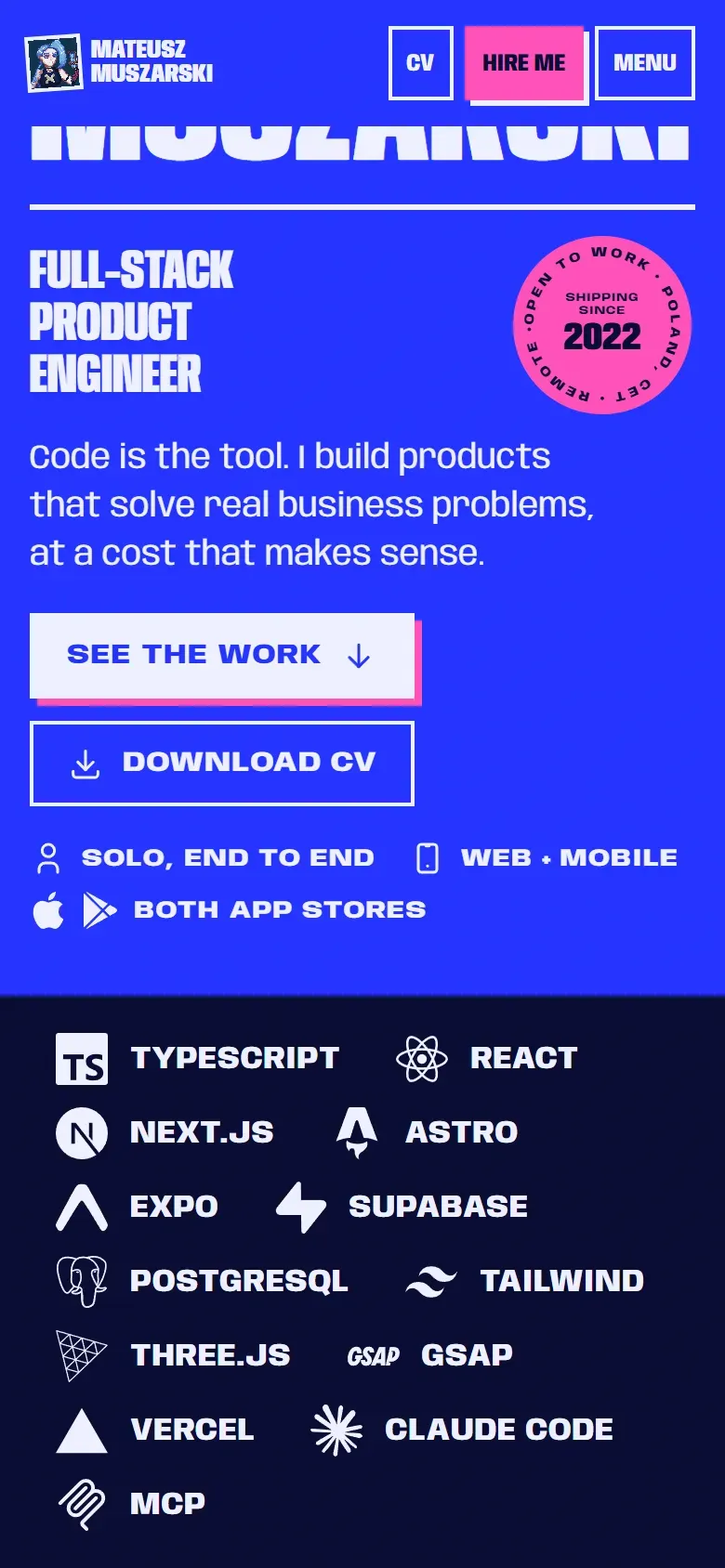 Reduced motion
 The pause button is hidden too. With nothing moving, a pause button is noise.
How does one pause button stop everything?
The pause state is one class on <html>. CSS reads it, and JavaScript loops ask a shared function.
export const motionStill = () => reduce.matches || root.classList.contains("still");

export function setPaused(paused: boolean) {
  root.classList.toggle("still", paused);
  try {
    if (paused) localStorage.setItem("motion", "still");
    else localStorage.removeItem("motion");
  } catch {
    // storage blocked: the choice lasts for this page only
  }
  notify(); // loops subscribed with onMotion() react at once
}
.still *, .still *::before, .still *::after {
animation-play-state: paused !important;
}The details that matter:
- One rule reaches every CSS animation, including ones added later. JavaScript loops check
motionStill()on every frame or step, so the letter accordion eases back to rest and stops. - It's a real button with
aria-pressed, in the menu and the footer, every copy in sync. The label swaps between "Pause motion" and "Play motion". - It's remembered. A tiny inline script in the
<head>applies the stored choice before the first paint, so the next page never starts moving and then stops. - It resumes where it stopped. Per MDN, a resumed animation starts "from where it left off", which 2.2.2 allows. The accordion ramps back in over 1.6 s.
A Playwright test clicks the footer button, checks that the marquee is paused, opens the Polish home page and checks the pause is still on.
Why stop loops nobody sees?
MDN names this use case for Intersection Observer: "deciding whether or not to perform tasks or animation processes based on whether or not the user will see the result". Here every section starts paused, and a script marks the ones near the viewport:
const sections = new IntersectionObserver(
  (entries) => entries.forEach((e) => e.target.classList.toggle("near", e.isIntersecting)),
  { rootMargin: "80px 0px" },
);
for (const section of document.querySelectorAll(".sec")) sections.observe(section);
.js .sec:not(.near) *,
.still * {
animation-play-state: paused !important;
}The 80 px margin starts a loop just before its section scrolls in, and the first section carries near in its HTML, so the first screen never waits for the script.
The first version worked the other way round: it marked every offscreen section off. On load that restyled 1,658 elements, about 330 ms of main-thread time in a trace with 4x CPU throttling (7 October). Starting paused means only the sections in view change. The project chapters' loops also wait for your first move.
What if the reveal script fails?
The common reveal-on-scroll pattern hides elements in CSS and lets a script show them as they scroll in. If that script is blocked, throws, or arrives late, the content stays invisible. Here the hidden state only exists once the script says it is running:
.rv-ready:not(.still) .rv:not(.in) {
  opacity: 0;
  transform: translateY(1.5rem);
}
The script adds rv-ready to <html> itself, after it starts observing. No script, no hidden content. Paused motion turns the hidden state off too.
Why does the heading never animate on load?
The H1 on the home page is my name and the Largest Contentful Paint element. Google's web.dev guide excludes elements with an opacity of 0 from LCP, so fading that heading in makes the LCP wait for the fade. It is also the first thing anyone reads.
So the name is final in the first paint (fitted to its container at build time). The lines under it are visible too and only settle a few pixels into place, in CSS. Reveals start below the first screen.
Can a paused entrance freeze on its first frame?
Yes, and it happened here. animation-fill-mode: backwards (or both) applies the first keyframe during the delay, and animation-play-state: paused holds an animation where it is. On 5 October a stored pause, applied before the first paint, held entrances at their first keyframe: invisible.
A pause should skip entrances to their end, not freeze them at the start. Entrances here carry a class, and a pause switches them off:
.still :is(.rise, .enter) {
  animation: none !important;
}
A Playwright test now stores the pause, loads the home page and checks that the hero text and the sticker are fully visible.
What goes on the checklist?
- One real
<button>witharia-pressedpauses every loop that runs over 5 s (2.2.2). - The choice is stored, applied before the first paint, and survives blocked storage.
- Reduced motion shows final states: CSS finishes at once, JavaScript loops never start.
- Loops stop offscreen; frame loops stop scheduling when idle.
- Reveals hide content only after their own script has started.
- The LCP element never fades in.
- Tests reload with the pause stored and emulate reduced motion (
page.emulateMedia({ reducedMotion: "reduce" })), then check what the reader sees.
Limits
- I haven't measured the CPU or battery saving from stopping offscreen loops. The argument doesn't need a number: motion nobody sees has no reason to run.
- Reduced motion is tested by emulation in Playwright, not with each operating system's real setting.
- The settings paths come from MDN; I haven't checked every system myself.
The rest of the build is in the case study of this site. To try the button, open the menu or scroll to the footer of the work page and press "Pause motion".
Sources
- Understanding SC 2.2.2: Pause, Stop, Hide (W3C WAI, WCAG 2.2) (opens in a new tab) (accessed )
- Understanding SC 2.3.3: Animation from Interactions (W3C WAI, WCAG 2.2) (opens in a new tab) (accessed )
- prefers-reduced-motion (MDN) (opens in a new tab) (accessed )
- Intersection Observer API (MDN) (opens in a new tab) (accessed )
- animation-play-state (MDN) (opens in a new tab) (accessed )
- animation-fill-mode (MDN) (opens in a new tab) (accessed )
- Largest Contentful Paint (LCP), web.dev (opens in a new tab) (accessed )